SAW
- Special Access to WindowsSAW
- Special Access to Windows
SAW
- Special Access to WindowsSAW
- Special Access to Windows|
|
||||
| HomeDownloadsDevelopers AboutContactLinks | ||||
About - SAW |
||||
|
|
||||
|
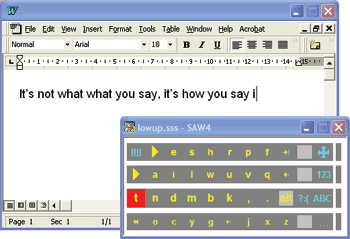
Today we all take accessing a computer for granted but how could you do this if you did not have access to your keyboard or mouse. SAW - Special Access to Windows provides an alternative access for people using Switches, Headmouse, and other pointing devices. For the switch user, accessing the essentially mouse-driven Windows environment appears to be a formidable task. SAW (Special Access to Windows) - it's software that enables Windows to be controlled by one or two switches, a joystick, a trackerball or a headpointer. SAW has many additions and features to make creating interfaces easy for those who use alternative inputs. there are versions of SAW that run under Windows 95, 98, ME and 2000 and XP. SAW replaces the mouse and keyboard with a series of onscreen Selection Sets - arrangements of letters, words, symbols, numbers and shapes that can be automatically or manually scanned, item by item, and selected using switches. You can write, draw, move the cursor around the screen - SAW4 gives you the access power to all aspects of operation. The image below shows a selection set being used to enter text into a word processor. We've created some freely-downloadable selection sets that cover mouse navigation, Internet Explorer, Outlook Express and word processing (with integrated links to Prophet, PenFriend or WordAid) and mathematical drawing through AccessMaths. See the Selection Set page for more details. Of course, you're welcome to develop your own and we invite you to distribute them through this website. Choose your flavour There are two versions of SAW, and both of them are free! If all you need is access to and customisation of pre-made selection sets, then try SAW Lite. For those who want to try their hand at the relatively straightforward process of creating their own selection sets, there's SAW Designer. The downloadable session-limited demo in the right-hand menu contains both versions, and is unlockable by a free software key (registration required).
|
Click to enlarge |
||
|
|
||||
| Home | Downloads | Developers | About | Contact | Links | ||||
 Switch
Users
Switch
Users